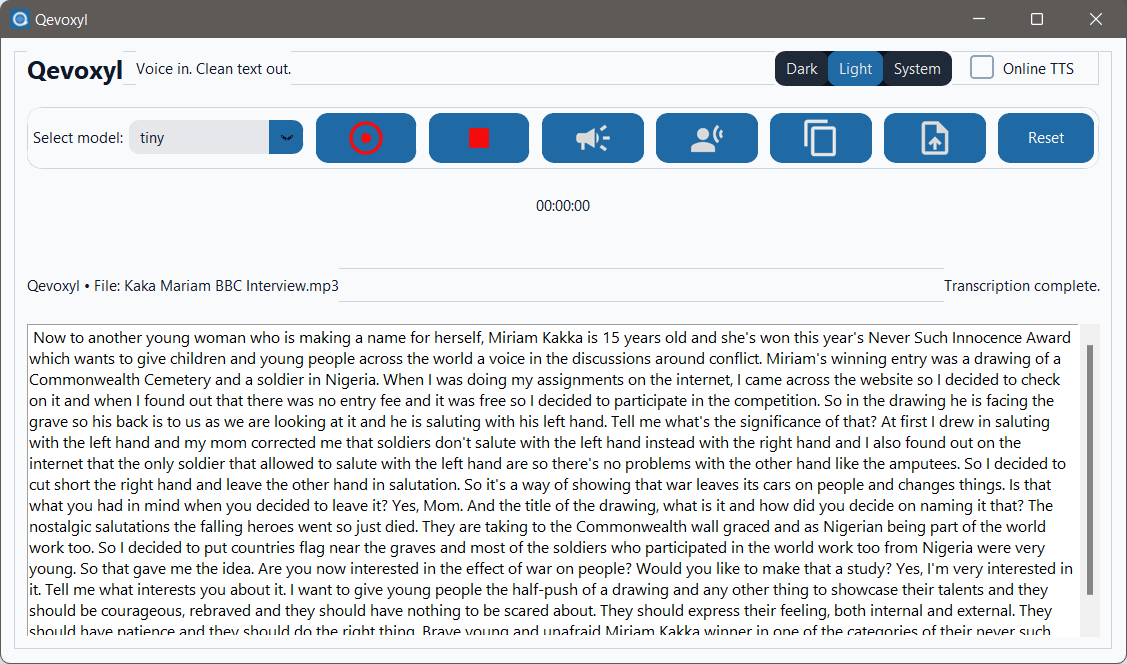
Qevoxyl is a privacy-preserving desktop app for speech-to-text. It runs Whisper offline, integrates with Windows, and installs without admin rights.
Simple, installer-grade desktop transcription with local privacy.
Transcribe locally with Whisper. Audio stays on your machine by default—no cloud uploads.
Per-user install (no admin), Start Menu & Desktop shortcuts, and a right-click Explorer action.
Runs well on CPU with fp32; leverages CUDA for fp16 acceleration when available.
One-click recording, or open existing WAV/MP3. Copy text or read it back with TTS.
From mic to text in a few clicks—no cloud required.
Capture audio with the built-in recorder, or choose an existing file.
Pick a Whisper size to balance speed and accuracy.
Qevoxyl runs Whisper on-device using FFmpeg for decoding.
Copy cleaned text or let the TTS read it back.
Per-user installer, no admin required. Windows 10/11 (x64).
Includes Start Menu/desktop shortcuts and Windows Explorer right-click integration.
Download InstallerSHA-256 (installer): 7C554B02CBE927C0DB8BAC46CF52B86756195A83C4A720CFC260215D4DD8B479
Verify checksums after download for extra assurance.
v1.3.0 — Quality & stability update
Qevoxyl is built for privacy. Here’s the quick version:
Answers to common questions.
%LOCALAPPDATA%\Qevoxyl\ (e.g., models, recordings, voice, logs). This avoids admin prompts and keeps data per-user.
.wav and .mp3. Right-click a file and choose “Transcribe with Qevoxyl.”